How to Avoid Common Troubles During Mobile Phone Screen Installation
Essential Tips for Repair Technicians to Prevent Ghost Touch, Flicker & No Display
For mobile phone repair technicians, the quality of screen installation directly determines the user's experience and the reputation of the repair service. Many tricky issues that occur after screen replacement, such as ghost touches, screen flickering, and abnormal display, are not necessarily caused by defective screen products. Instead, they are often related to ignoring some key details during the installation process. Today, we will focus on several core precautions to help you effectively avoid these installation pitfalls.
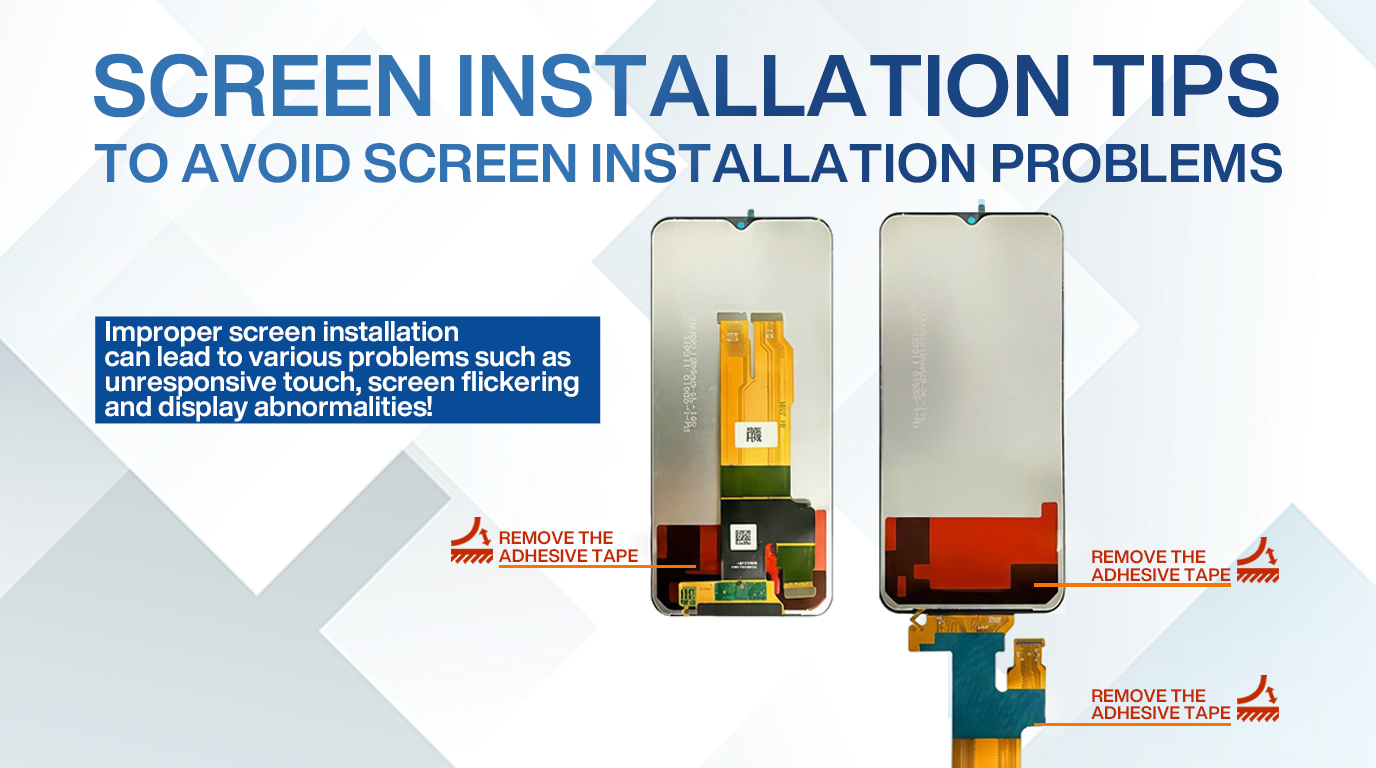
Key Precaution 1: Must Tear Off the Adhesive Tape on the Flex Cable!
When you receive a new mobile phone screen, you will find that there is usually a layer of adhesive tape attached to the flex cable. This adhesive tape is only used for fixed protection during transportation and storage, and must be completely torn off before installation. Many novice technicians or those who are in a hurry may overlook this step. If the adhesive tape is not removed, it will not only affect the fit between the flex cable and the connection port but also may cause poor contact due to the obstruction of the tape, laying hidden dangers for subsequent malfunctions.
Key Precaution 2: Ensure the Flex Cable is Flat and Tight with the Iron Backlight After Tearing Off the Adhesive Tape!
Tearing off the adhesive tape on the flex cable is only the first step. Next, you need to pay special attention to the fitting state of the flex cable and the iron backlight. After removing the tape, align the flex cable correctly with the iron backlight and press it firmly to ensure that they are completely flat and tight. The iron backlight not only plays a role in backlighting but also serves as an important part of the connection and heat dissipation. If the flex cable is not attached tightly, it will lead to unstable signal transmission between the screen and the motherboard. At the same time, the gap between the flex cable and the iron backlight will affect heat dissipation, which may trigger a series of problems.
Key Precaution 3: Tear Off the Cover Film to Prevent Heat Dissipation Problems and Chip Damage!
In addition to the adhesive tape on the flex cable, there is also a layer of cover film on the new screen. This cover film is used to protect the screen surface from scratches during transportation. It must be torn off before installation. If the cover film is not removed and the screen is installed directly, the closed environment after installation will block normal heat dissipation. The most direct consequence of this is that the chip position will overheat. Overheating can easily cause functional problems such as screen jumping and no touch. If the high temperature persists, it will directly burn the chip, leading to a more serious failure of the screen being completely black and no display. This kind of failure caused by improper operation is not covered by the product warranty, which will bring unnecessary losses to both the repair technician and the user.
To sum up, the three key precautions mentioned above—tearing off the adhesive tape on the flex cable, ensuring the flex cable is flat and
tight with the iron backlight, and tearing off the cover film are the core to avoiding common screen installation troubles. Ghost touches, screen
flickering, abnormal display, chip burning, and other tricky issues that puzzle many repair technicians can be effectively avoided by doing these three steps well.
As a professional mobile phone repair technician, paying attention to these seemingly small details is the basic requirement for providing high-quality repair services. We hope this article can help you solve the troubles encountered in screen installation and improve the efficiency and quality of your repair work. If you have more questions about mobile phone screen accessories or installation skills, welcome to leave a message in the comment area for discussion!